
NIXI (National Internet Exchange of India) requires mandatory identity verification for all .IN and .BHARAT domain registrants. Domains not verified within 90 days are suspended.
Who Needs to Verify
| Registrant Type | Email Verification | eKYC via Digio |
|---|---|---|
| Individual | Required | Required |
| Organisation | Required | Required |
eKYC is for Organisations/Companies as well (Aadhaar via DigiLocker).
How Verification Works
After registering, transferring, or modifying contact details on a .IN domain, your control panel shows that verification is in progress and a verification email will be sent to your registrant email address.
The verification email contains two actions:
- Verify your email address: click the link in the email
- Complete eKYC : click the Digio link to verify via Aadhaar on DigiLocker
Your Aadhaar number is never stored. Only the verification status is recorded.
Verification Status in Your Panel
Your control panel shows the current verification status for each .IN domain.
Pending verification — domain is active but action is required:
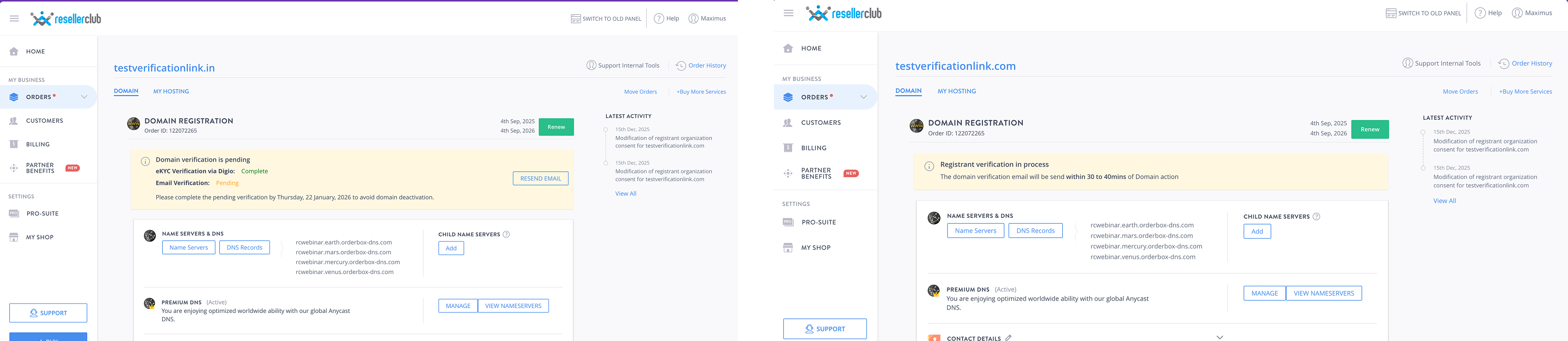
Use the Resend Email button on the banner to get a fresh verification link at any time.
Managing Contact Details
A new verification cycle is only triggered when the registrant email or phone number changes. Updating name or address does not re-trigger verification.
To update contact details, go to your domain's contact management section and edit the registrant contact.
When saving contact details for .IN or .BHARAT domains, you must tick a confirmation checkbox before the Save button is enabled:
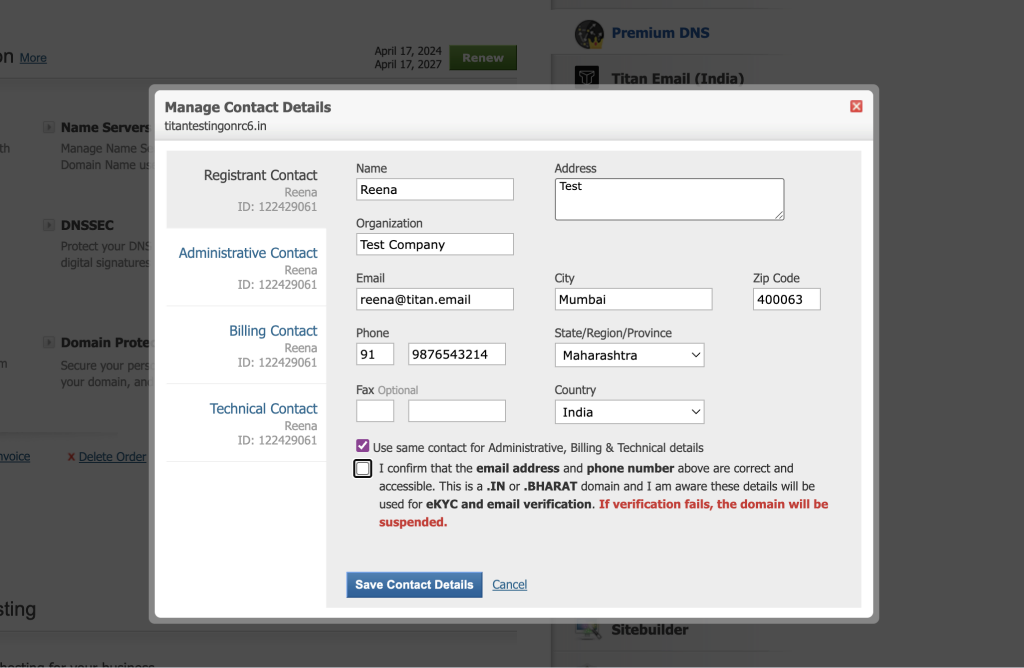
"I confirm the phone number and email address above are correct and understand that the associated .IN/.BHARAT domain will be suspended if eKYC and email verification is not completed."
Renewing a .IN Domain
The renewal modal shows your registrant email and phone on file. Confirm they are correct before renewing — these are used to send post-renewal verification instructions.
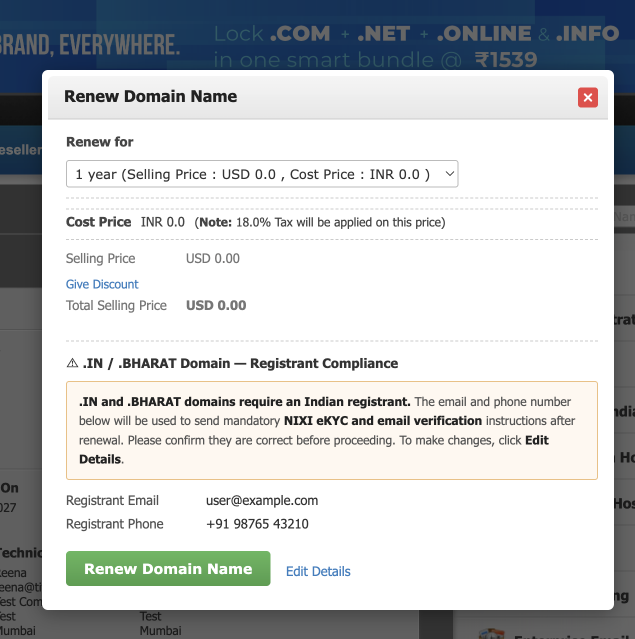
If you need to update them, click Edit Details in the modal before submitting.
Renewal-triggered verification does not cause suspension. Suspension only applies to verification triggered by registration, transfer, contact modification, or domain move.
Suspended Domain — How to Restore
- Open the affected .IN domain in your control panel
- Click Resend Email on the Verification Failure banner
- Complete verification from the new email
- Domain is automatically restored — no manual action needed
Suspended domains are not deleted. They remain on hold until verification is completed or the domain expires.
Quick Reference
| Situation | What to Do |
|---|---|
| Just registered a .IN domain | Check email > verify email + complete eKYC within 90 days |
| Renewing | Confirm registrant email and phone in the renewal modal |
| Updated contact details | Re-verify only if email or phone changed |
| Domain suspended | Resend Email > complete verification > auto-restored |
| No verification email received | Check spam > use Resend Email in your control panel |
| Foreign registrant | Email verification only — eKYC not required |
FAQs
What is eKYC?
Identity verification via Digio using Aadhaar.
How long do I have?
90 days from when verification is triggered. Reminder emails are sent throughout.
Will renewing my domain cause suspension if I don't verify?
No, renewal-triggered verification does not lead to suspension. Verification from registration or contact changes still applies.
Domain still suspended after verifying?
Restoration is automatic but can take a few hours. Contact support if it persists.
For help, contact your registrar's support team with your domain name.